Mobile MMORPG: what it is like to play a free online RPG on your phone, in the same world as PC
A good mobile MMORPG brings three things together: controls made for touch, sessions that fit in a few minutes and a living world full of other players. Echoes of Aora runs straight in your phone browser, with nothing to download from an app store, and uses the same account and the same world as players on a computer.
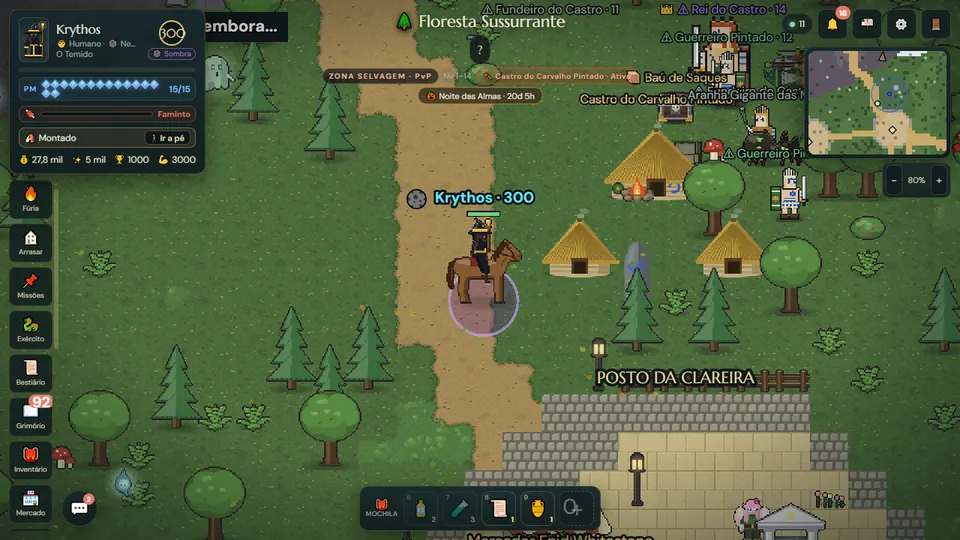
What does a mobile MMORPG need?
On a phone, an MMORPG faces problems a computer never does: the screen is small, there is no keyboard or mouse, the battery runs out and sessions happen in a queue or over a lunch break. A game that simply shrank its PC version ends up full of tiny buttons and menus that cover the map.
What works is the opposite: controls built for a thumb, an interface that adapts to the device, short goals for each session and the same shared world as always, with real players walking beside you.
Can you play Echoes of Aora on your phone?
Yes. Echoes of Aora is a free online RPG that runs in the browser, and a phone browser works just as well as a computer one. You open the site, create an account and you are in the world. There are no gigabytes to download and no patch to wait for: the game updates itself every time it opens.
The game is designed for a phone held sideways, in landscape. Upright, there is too little height for the map, so a "Turn your phone" screen appears, with the option to keep playing upright anyway.
How do the touch controls work?
- Moving: use the on-screen joystick or tap the ground where you want to go.
- Fighting: one tap on a creature selects it and shows the ⚔ button; a double tap starts the battle. Combat is real time, right on the map: you keep moving with the stick to dodge and your staff fires at the target on its own.
- Spells and army: your spells and class power sit in the bottom corner; tap your army creatures to summon them into the fight.
- Consumables: potions and food sit on a quick bar at the edge of the screen, one tap away, in and out of battle.
- Map: tap the minimap to open the big map.
In the interface settings you pick the size of buttons and panels, make panels more transparent, move the joystick to the other side for left-handed play and choose which damage numbers show up. On a phone in landscape the chat stays compact and shows a badge when new messages arrive, so it never covers the map.
How to install the game on your phone without an app store
- Open echoesofaora.com in your phone browser and sign in.
- In the game's Settings, tap Install under "Play as an app". If the button does not show up, open the browser menu and choose "Install app" or "Add to Home screen".
- Launch it from the new icon: the game opens full screen, in landscape and without the browser bar.
Once installed, the game can send alerts to your phone, such as when your kingdom is under attack, if you turn that option on. And since it is still a website, it does not take up space like a heavy app.
Playing on phone and PC with the same account
Your character is saved on the server, not on the device. You hunt on your phone during the day and carry on at the computer at night, from the exact spot where you stopped, with the same creatures, the same bag and the same kingdom. Phone players and PC players share one world: you can call a friend who is on a computer to hunt together, trade at the market or fight side by side in a war.
What can you do in a short session?
- Follow a mission: the 📌 panel shows the goal and draws a dotted route to it on the map.
- Hunt and capture: beat a wild creature and try to bind it with a seal for your army.
- Look after your kingdom: in the Free Lands, check on your villagers, your towers and what was produced while you were away.
- Buy and sell: stop by the merchant at the nearest refuge and keep what matters in the city chest.
An online RPG takes time to grow, but that time does not have to come all at once: ten minutes here and there level up your mage too.
Tips for playing better on a phone
- Play with the phone sideways and, if you can, installed on the home screen: full screen leaves more map.
- Prefer Wi-Fi over a weak mobile connection: in real-time combat, a stable connection matters as much as the device.
- On a basic phone, pick the small interface and show only your own damage numbers, or none. If the device slows down, the game switches on a light mode by itself, with fewer effects.
- Close other open apps, especially videos, before a big fight.
Read also
- MMORPG for Low End PC and Mobile: A Light Online RPG
- Free Online RPG Games to Play With Friends
- RPG for Beginners: A Complete Guide to Start Playing
Frequently asked questions
Is Echoes of Aora a mobile MMORPG?
Yes. The game runs in your phone browser, in landscape with touch controls, and can be installed on your home screen as an app straight from the browser.
Do I need to download anything from an app store?
No. Just open echoesofaora.com in your phone browser. If you want an icon on your home screen, the browser installs it in a few seconds.
Can I play on phone and computer with the same account?
Yes. Your character is saved on the server: you pick up where you left off on any device, and phone players share the same world as PC players.
Is the game free on mobile?
Yes. Echoes of Aora is free to play, on phones and on computers.
Can I play with the phone upright?
The game is made for a phone in landscape. Upright it shows a "Turn your phone" screen, but offers the option to keep playing upright anyway.